Icon of program: Smart PC

Smart PC for Windows

  • Trial version
  • 3.8
    32
  • 4.5K
  • V5.2

Clean your hard drive and optimize your system

System optimisation is a bit like security in that those who understand it, know how important it is and how to alter their browsing and usage habits to achieve it.

However, there are a huge number of titles that claim to offer a helping hand in streamlining your system, many of which promise the world but don’t deliver the goods.

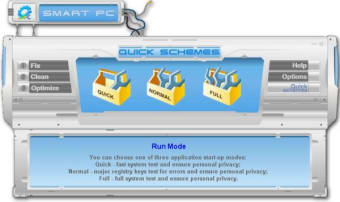
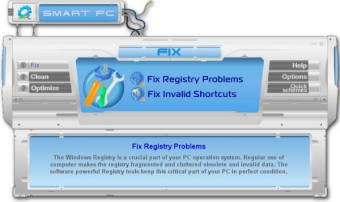
The makers of Smart PC have put plenty of effort into making an original interface but have they carried that over and made a tool that lives up to its name?

On first opening the program, it’s not immediately obvious what you’re supposed to do - its vaguely labelled buttons are plastered left, right and centre of the interface.

Thankfully, as you mouse over each, a separate window gives you a more detailed explanation and you can get started on whatever you need to do without complication.

Getting stuck into the options will generally give a good idea of who the software is aimed at and judging from those of Smart PC, it has been made with inexperienced users in mind.

Thanks to the very restricted level of control the user has, there are several important settings that haven’t been included. In comparison to a free alternative that does the same job, CCleaner, Smart PC is lacking secure deletion, an update check and most importantly, it only examines the cookies from Internet Explorer, totally ignoring those of Firefox.

Smart PC regains some kudos with its log file system, which by default saves fifteen log and undo files, should the registry changes have an adverse affect on your PC.

The clean and optimize features are run-of-the-mill for this kind of software and don’t bring anything to the table that you wouldn’t be able to do with a few clicks in the regular Windows interface.

The most striking thing about Smart PC is that it practically holds the users at arm’s length from doing anything that could damage their computer but while doing so also limits the amount of optimisation that can take place.

As a simple click-and-forget solution it’s great, but for more serious optimisation, it makes better sense to use the free CCleaner, or to start studying so you can get your hands dirty with the registry.

Changes

Supports Windows Vista

  • Pros

    • Useful backup of changes it makes
    • One click solution
    • Creative interface design
  • Cons

    • Removes more control from the user than necessary
    • Ignored cookies from Firefox
    • Trial doesn’t fix all errors
 0/3

App specs

  • License

    Trial version

  • Version

    5.2
  • Latest update

  • Platform

    Windows

  • OS

    Windows NT

  • Language

    English

    Available languages

    • German
    • English
    • Spanish
    • French
    • Italian
  • Downloads

    4.5K

    Last month's downloads

    • 6
  • Size

    3.14 MB

  • Developer

Program available in other languages


Icon of program: Smart PC

Smart PC for PC

  • Trial version
  • 3.8
    32
  • 4.5K
  • V5.2

User reviews about Smart PC

Have you tried Smart PC? Be the first to leave your opinion!

Add review

You may also like

Alternatives to Smart PC

Explore Apps

Latest articles

Laws concerning the use of this software vary from country to country. We do not encourage or condone the use of this program if it is in violation of these laws.
Softonic

Is Smart PC safe?

73/100

Score result: Warning

This file has been flagged as potentially harmful or containing unwanted bundled software. Please proceed with caution.

  • Virus free
  • Spyware free
  • Malware free
  • Verified by Security Partners

    VirusTotal logo

Scan Info

Last scan
Thursday, November 23, 2023
Scan provider
VirusTotal · Full report

File Integrity

File
smartpcsetup.exe
SHA256
3f8f0bcdb83afd222f4221cf2d4827d74d91786abee9bdc72e5239bd47fd82e0
SHA1
3518cd8c9fffd4e723b252ea9b3620b1fdc8ab7f

Softonic security notice

This software has been thoroughly scanned by our advanced security systems and verified by industry-leading partners. However, one or more antivirus engines have flagged this software with potential risks. While these detections may be false positives, we recommend caution when downloading and installing. Some programs may include unwanted software or behaviors that could affect your device. False positives can occur when safe software is mistakenly flagged as harmful due to overly cautious detection rules or algorithms in antivirus tools. This means the program may still be safe to use, but we advise reviewing the details before proceeding.